Wednesday, November 2, 2022

Azure Migration Project – Esxi VM Assessment Tool Live in Future - Live in Cloud


Ref : http://www.subhendumct.com/2018/11/03/azure-migration-project-esxi-vm-assessment-tool/


Why use Azure Migrate?

Azure Migrate helps you to:

  • Assess Azure readiness: Assess whether your on-premises machines are suitable for running in Azure.
  • Get size recommendations: Get size recommendations for Azure VMs based on the performance history of on-premises VMs.
  • Estimate monthly costs: Get estimated costs for running on-premises machines in Azure.
  • Migrate with high confidence: Visualize dependencies of on-premises machines to create groups of machines that you will assess and migrate together.

How does Azure Migrate work?

  1. You create an Azure Migrate project.
  2. Azure Migrate uses an on-premises VM called the collector appliance, to discover information about your on-premises machines. To create the appliance, you download a setup file in Open Virtualization Appliance (.ova) format, and import it as a VM on your on-premises vCenter Server.
  3. You connect to the VM from the vCenter Server, and specify a new password for it while connecting.
  4. You run the collector on the VM to initiate discovery.
  5. The collector collects VM metadata using the VMware PowerCLI cmdletS. Discovery is agent-less, and doesn’t install anything on VMware hosts or VMs. The collected metadata includes VM information (cores, memory, disks, disk sizes, and network adapters). It also collects performance data for VMs, including CPU and memory usage, disk IOPS, disk throughput (MBps), and network output (MBps).
  6. The metadata is pushed to the Azure Migrate project. You can view it in the Azure portal.
  7. For the purposes of assessment, you gather the discovered VMs into groups. For example, you might group VMs that run the same application. For more precise grouping, you can use dependency visualisation to view dependencies of a specific machine, or for all machines in a group and refine the group.
  8. After a group is defined, you create an assessment for it.
  9. After the assessment finishes, you can view it in the portal, or download it in Excel format.

Collected metadata by Collector Appliance ?

The collector appliance discovers the following static metadata for VMs:

  • VM display name (on vCenter Server)
  • VM’s inventory path (the host/folder on vCenter Server)
  • IP address
  • MAC address
  • Operating system
  • Number of cores, disks, NICs
  • Memory size, Disk sizes
  • Performance counters of the VM, disk and network.


Tuesday, November 1, 2022

Top 10 Must-Have AWS Cloud Migration Tools in 2022

 Is your current cloud cost tool providing you with the necessary cost intelligence? The majority of tools are manual, clumsy, and imprecise.

Migrating to cloud platforms such as Amazon Web Services (AWS) is an iterative process that evolves as organizations develop new skills, processes, tools, and capabilities. Moving any workload from on-premise environments or other hosting facilities to public clouds is included.

Before we get into the list of popular AWS migration tools, let us first define AWS migration and the benefits it provides.

In this blog, we’ll discuss:

  1. CloudZero Migration Cost Monitoring
  2. AWS Migration Services
  3. Carbonite Migrate
  4. Cloudsfer
  5. CloudFuze
  6. CloudEndure (AWS CloudEndure)
  7. Corent SurPaaS MaaS
  8. Dynatrace
  9. Fivetran
  10. VM Import/Export

What Is An AWS Cloud Migration Tool? Why Use One?

The term “cloud migration tool” refers to a service, piece of software, or middleware that helps with data transfer, application configuration, bridging infrastructure, file format, storage type, and other compatibility gaps between your current systems and the AWS cloud.

Simply put, a cloud migration tool is a service that allows businesses to automate data migration from one environment to the AWS cloud.

The service can help:

  • Determine which improvements to make.
  • Choose which security protocols to use.
  • Choose the best-supporting infrastructure for your data, applications, and use cases.Top 10 Must-Have AWS Cloud Migration Tools in 2022

Key Benefits Of Using AWS Cloud Migration Tools

Here are the major reasons why the implementation of AWS migration tools can help in the smooth functioning of the AWS data migration service:

  • Savings on infrastructure costs
  • Improved infrastructure management
  • Unplanned downtime has been reduced.
  • Less severe security disruptions
  • Data migration that is mature and foolproof
  • Time to business gains is diminished.
  • Organizational flexibility, business agility, and productivity
  • Long-term viability with lots of server capacity

However, not all AWS migration services and tools are created equal.

So, how do you locate the best AWS migration software for your requirements?

The 10 Best AWS Cloud Migration Tools

Moving, synchronizing, and optimizing large volumes of data can be simple, secure, fast, and cost-effective with the right migration service.

Consider the following options:

1. CloudZero Migration Cost Monitoring-

CloudZero assists teams in continuously monitoring AWS migration costs at every stage of the process. With Cloudzero’s Migration Cost Monitoring, you can track costs and progress as you migrate workloads to AWS in real time.

CloudZero provides a standalone dashboard in the AWS Marketplace to track credits and maximize savings. CloudZero gives you visibility into your MAP workloads by assisting you in tracking credits and tagging — allowing you to maximize discounts, understand savings, and get a complete picture of your cloud spending.
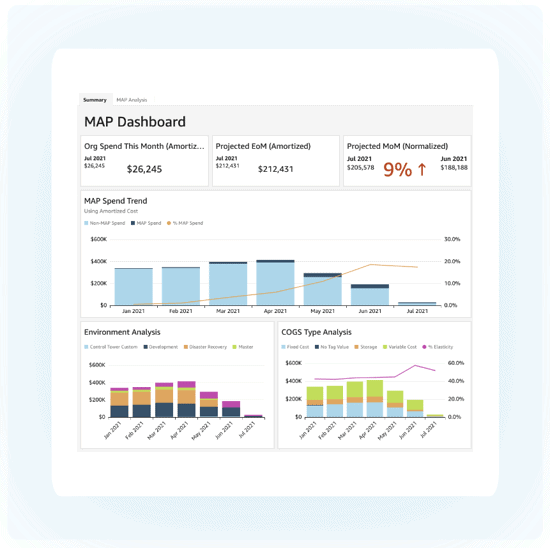
CloudZero Migration

2. AWS Migration Services

If you’re looking for a variety of native AWS tools, including free ones, check out:

  • AWS Application Discovery Service – Analyzes and maps dependencies and server utilization in your on-premises data center to assist you in planning a migration.
  • AWS Migration Hub – A single location to track the progress of application migrations across multiple AWS solutions and partner services.
  • AWS Server Migration Service – If you intend to migrate large workloads from on-premises servers to AWS, use this agentless service. It’s ideal for coordinating live server migrations in order to automate, schedule, and track incremental replications of live server volumes.
  • AWS Application Migration Service – This one allows for non-disruptive testing to ensure that your AWS applications run smoothly. It also migrates your source servers from cloud, virtual, or physical infrastructure to AWS.
  • AWS Database Migration Service- It also supports data streaming to Amazon Redshift and uses cases requiring continuous data replication with high availability.

Other AWS Cloud Migration Tools to consider But the ones mentioned above are the most important.
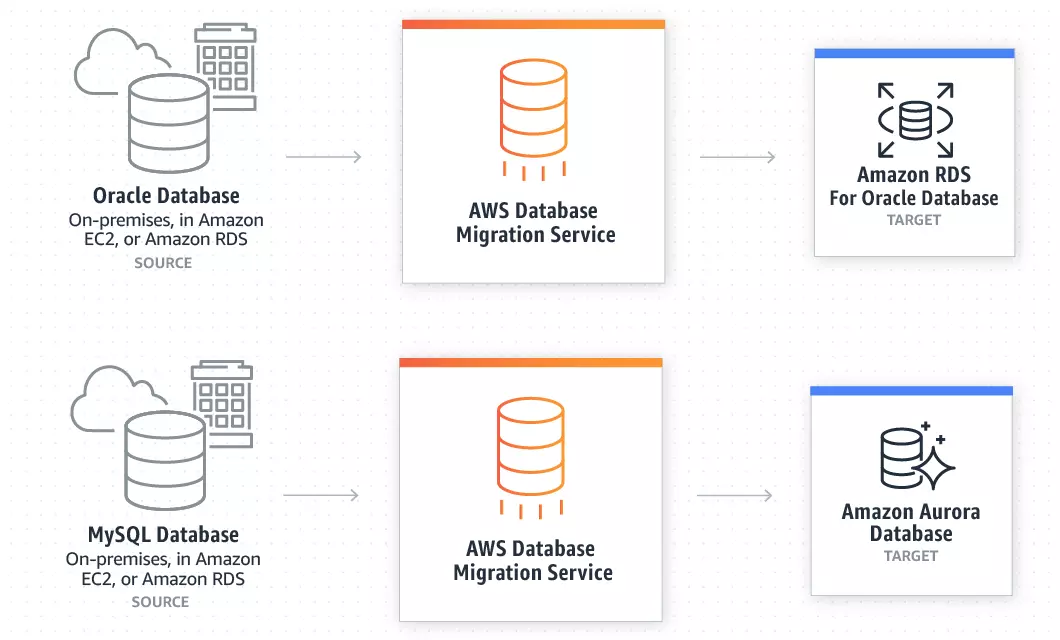
AWS Migration Service

3. Carbonite Migrate

Carbonite Migrate is an online service that allows Linux and Windows server migrations to AWS and AWS Outpost. Red Hat Enterprise Linux, Ubuntu, SUSE Linux Enterprise, CentOS, and Oracle Enterprise Linux are all supported Linux operating systems.

It promises to enable fast and AES 256-bit encrypted data transfer from, to, and between any combination of virtual, physical, or cloud-based platforms — all with minimal downtime.

The service also allows teams to test the environment as frequently as they need with minimal disruption to ensure that everything works properly.
Carbonite Migrate

4. Cloudsfer

Cloudsfer from Tzunami is a cloud-to-cloud and on-premises-to-cloud content transfer solution. To ease the migration, you can perform a pre-migration assessment, gain performance insights during migration, and keep permissions and security configurations.

It should also support the migration of configuration, users, security, and metadata.

Cloudsfer also provides backup services for cloud data and supports over 20 cloud storage providers, including Amazon S3, SharePoint, OneDrive, Box, Dropbox, Drive, and Egnyte. You can instantly copy and transfer data using a centralized user interface and third-party connectors.
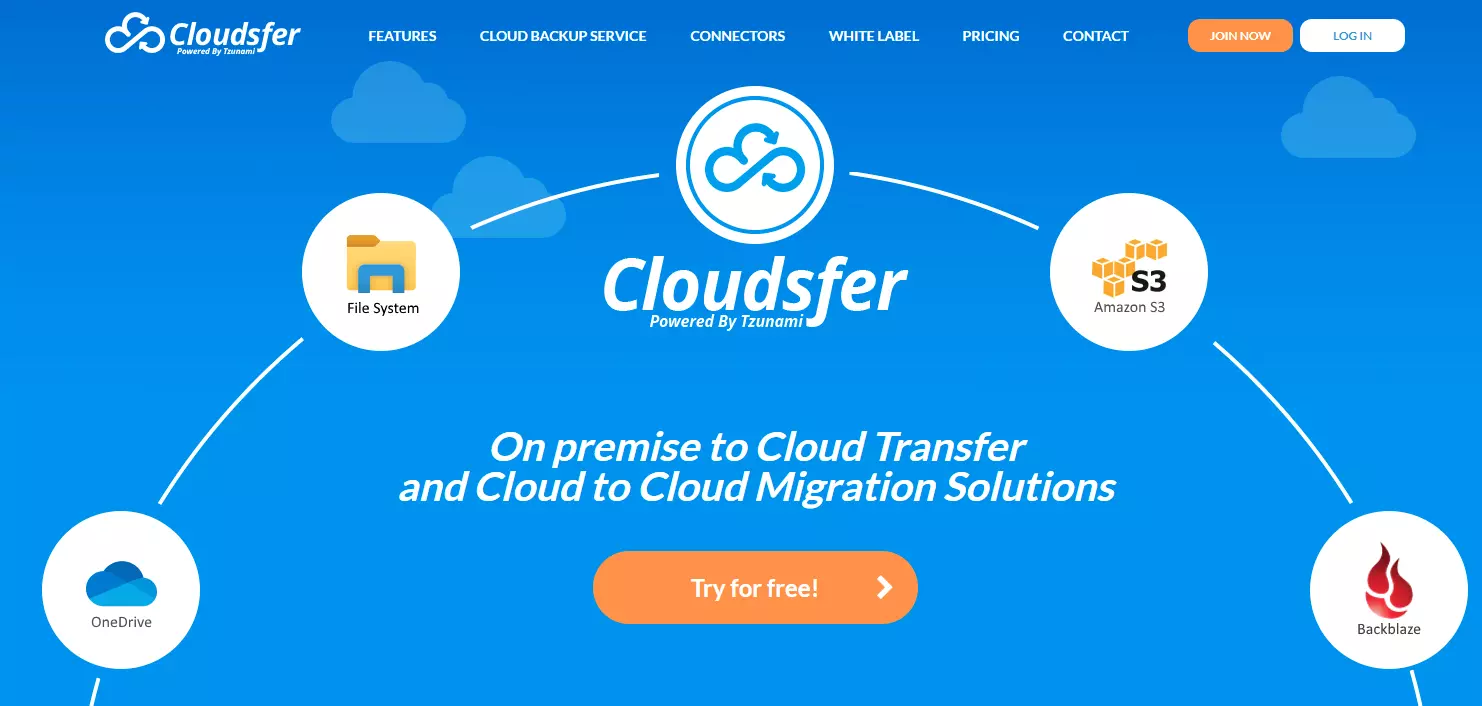
Top 10 Must-Have AWS Cloud Migration Tools in 2022: Cloudsfer

5. CloudFuze

CloudFuze is a cloud-to-cloud migration service that allows users to move cloud files and users between different cloud accounts. For small and large enterprises alike, it also supports file permission migration, cloud file management, and one-way and two-way sync.

It can be used to transfer large amounts of data from a business cloud storage service, such as Dropbox Business, to Amazon S3.

It promises fast data transfers, a high-quality infrastructure, and data security during migrations. Managed migrations are available for businesses that require assistance.
Top 10 Must-Have AWS Cloud Migration Tools in 2022: CloudFuse

6. CloudEndure (AWS CloudEndure)

CloudEndure supports on-premises to cloudcloud-to-cloud, and AWS region-to-AWS region migrations. Because it was recently acquired by AWS, it will be merged with AWS Application Migration Service.

Because it allows workloads to run natively on AWS, CloudEndure Migration is ideal for lift and shift migrations to AWS. Its disaster recovery service includes more Amazon Web Services regions and operating systems than AWS EDR.

As a result, you can safeguard your MySQL, SQL Server, and Oracle databases, as well as enterprise applications like SAP. You can quickly restore operations in the event of a disruption, making AWS your compliance-ready recovery site.
CloudEndure

7. Corent SurPaaS MaaS

SurPaaS MaaS is a migration-as-a-service for businesses that want to quickly and easily analyze and transfer applications to the cloud.

As you plan your migration, you can use this software to create a cloud migration feasibility report to assist you in selecting the best migration strategy.

Furthermore, it is ideal for automatically and easily migrating an entire app or data center to the cloud. It can also be used to transfer data between clouds or from physical servers to the cloud. It allows for seamless integration of your application and a PaaS service.
Top 10 Must-Have AWS Cloud Migration Tools in 2022: Corent

8. Dynatrace

Dynatrace OneAgent combines AWS cloud migration agent and agentless. It promises to assist you in creating an automatic dependency map of your entire stack on AWS in minutes.

It continuously collects logs, transaction traces, and system and performance metrics. For optimal performance, OneAgent also links application services before and after migration.

Dynatrace is an excellent migration tool for hybrid cloud environments due to its multi-data-center engine. Additionally, you can use CI/CD tools to prevent broken builds from causing disruptions and run multiple tests to detect architectural regressions.
Top 10 Must-Have AWS Cloud Migration Tools in 2022

9. Fivetran

Fivetran allows you to extract, load, and transform (ELT) business data from a single system and store it in a centralized location. This means that you can move data from an app, website, server, or SaaS like Salesforce to a central location, such as a data warehouse, for further analysis or storage.

Fivetran provides real-time replication of cloud and on-premises data in AWS. It also provides pre-built, cloud-based connectors that adapt to source changes automatically and deliver analysis-ready schemas.

You can also sync all of your data sources to Amazon Redshift, use AWS Lambda to automate the ELT process, and use Amazon CloudWatch to monitor logs and metrics to track the progress of Fivetran’s data connectors.
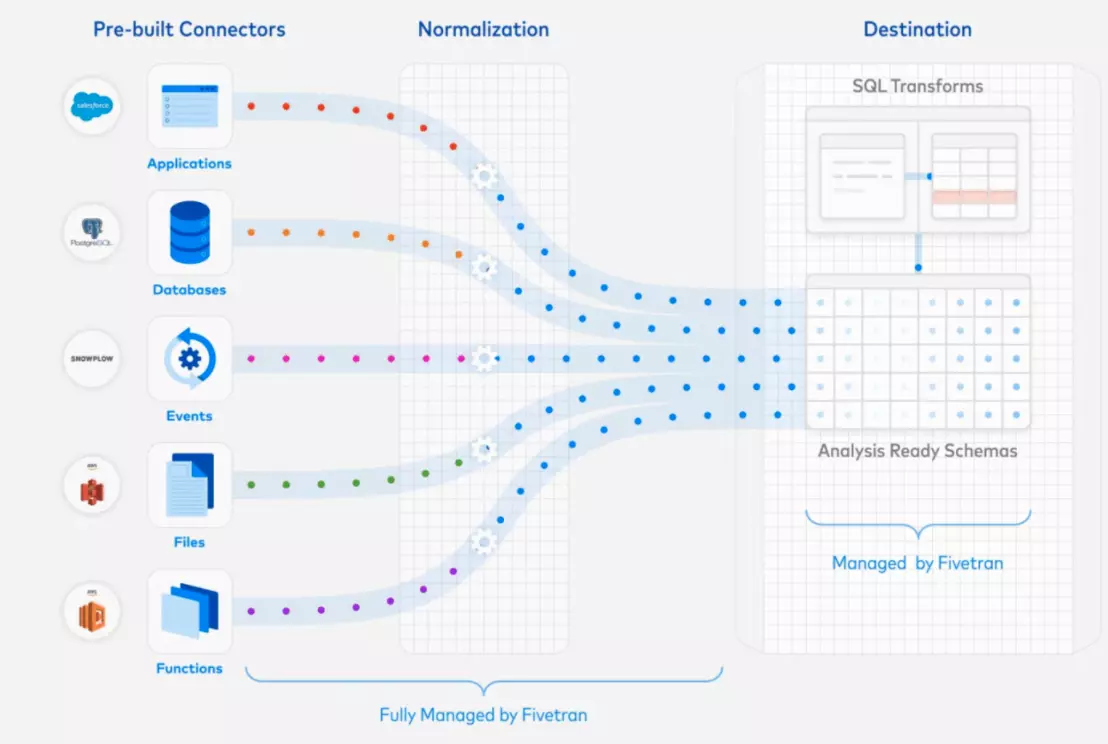
Fivetran Migration

10. VM Import/Export

This is another AWS service. Companies that have configured virtual machines can use them with AWS services for free, except for the regular service fees associated with the specific AWS services they use — Amazon EC2 or Amazon S3.

Importing a VMware virtual machine image necessitates the use of a developer tool such as AWS CLI. You must be using VMware vSphere virtualization to import them via AWS Management Portal.

You can track migration progress, create AWS S3 buckets and upload VM images into them, and then launch your EC2 instances once you’re finished.
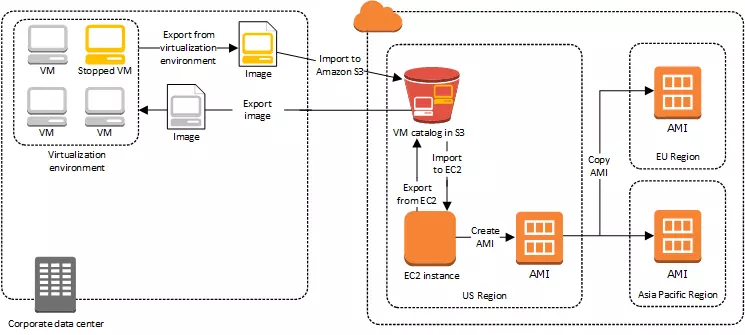
VM Import/Export

AWS Cloud Migration Tools: Summing It Up

There is a lot going on in the world of AWS migration, and the popular AWS data migration tools listed above play an important role in improving AWS cloud and data migration services. The cloud has brought about a revolution today, and it is powered by the giant Amazon. AWS cloud services provide exceptional migration services.

Of course, there are other factors to consider when deciding which tool to use. Whichever option you select, you are selecting the best of the best!

Frequently Asked Questions:

Q1. Which one is the free tool used for migration activities?
Ans: Azure DocumentDB is a free and open-source data migration tool from Microsoft that helps users migrate data to DocumentDB, a NoSQL document database. It is a completely manageable serverless database that scales automatically.

Q2. Which tool can be used during the assessment for cloud migration?
Ans: Tools for Cloud Assessment- Each platform provides a set of tools to assist with cloud assessment, including the AWS Migration Acceleration Program (MAP) and the AWS Migration HubAzure Migrate and the Microsoft Assessment and Planning Toolkit Google Migrate is a migration tool for Google Compute Engine and Google Storage Transfer Service.

Q3. Is AWS SMS a data migration tool?
Ans: AWS Server Migration Service (AWS SMS) automates the migration of virtual machines from on-premises VMware vSphere, Microsoft Hyper-V/SCVMM, and Azure to the AWS Cloud. AWS SMS replicates your server VMs incrementally as cloud-hosted Amazon Machine Images (AMIs) ready for deployment on Amazon EC2.

Q4. What are the must-have features of cloud migration tools?
Ans: Features are:

  1. Before migration, a built-in validation testing system is used.
  2. Rollbacks are used to secure data while it is being transferred.
  3. Data migrations and running workloads benefit from real-time streaming.
  4. Tools designed specifically for highly specific use cases, which is useful when migrating a single process or business unit to the cloud.

Q5. What are the three data migration tools available?
Ans: Three data migration tools:

  • On-premise data migration tools are used to transfer data between two or more databases/servers without transferring them to the cloud.
  • Tools for migrating data to the cloud from on-premises data stores, data lakes, applications, or other cloud data stores are known as cloud-based data migration tools.
  • Open-source data migration technologies are used to move data between cloud-based and on-premises storage systems.

Q6. How do migrations tools help in migration?
Ans: The primary purpose of cloud migration solutions is to enable you to easily transfer your data or apps onto the cloud. Your application architecture is modernized by the tool, which also enables you to keep a close eye on the migration procedure.

Monday, September 26, 2022

Azure Cloud Detection Lab Project


Azure Cloud Detection Lab Project


How to build a business case for cloud migration


How to build a business case for cloud migration

If your organization is operating on a more traditional on-premise model, then it’s probably time to shake things up in a big way.

As with any IT project, if you’re planning a move to the cloud you’ll need to prepare a tight business case to secure the support, resource, and budget from key stakeholders.

Cloud is the new normal, and most businesses today have either already moved their operations into the cloud or are in the process of migrating. Newer businesses tend to operate in the cloud from day one because of the features, computing power, and scalability it offers.

Why build a business case for AWS migration?

Business cases generally come about because your organization has a specific need that it can’t meet with its current tools or resources. This thing you want to achieve could be anything from increased customer engagement to better sales, being able to get more detailed insight into your data, or simplifying processes to make your company leaner.

“Value drivers like business agility, cost and risk management influence the business case for cloud migration,” explains Avon Puri, Chief Information Officer at Rubrik.

“For any company embarking on a cloud journey, moving the disaster recovery site to cloud could be the most compelling first use case. This not only reduces the complexity and minimizes the risk of data loss, but also brings the cost down significantly by eliminating the need for operating a secondary data center. Scalability, reliability, automation, on-demand usage are additional cloud drivers.

“Migration to the cloud enables companies to instantly provision self-service dev and test environments to developers and greatly enhance DevOps.”

No matter what the reason for migrating to the cloud may be, you’ll probably need to persuade stakeholders from across your business to get on board with your plans before taking any major steps towards it. You’re essentially trying to sell cloud migration as a solution to your organization’s pain points, to everyone from C-suite right down to your junior-level colleagues.

When your completed business case crosses a decision-maker’s desk, it needs to cover everything from the provider/s and products to timelines, costs, who you’ll need on board, the problem/s it solves, and how it all fits in with your organization’s goals and vision


Common cloud migration myths

There’s a lot of mistruths out there about cloud migration, and you’re bound to come up against at least a few when you’re making your case. Here are some prevalent figments to push out of your mind before you start:

“Moving to the cloud is always cheaper.” 
This one depends largely on what kinds of costs you’re comparing, but generally speaking, operating in the cloud is cheaper in the long run. In some cases, operating costs can be higher, but that’s down to poor cost control, inexperienced employees, a weak discovery stage, duplicate processes, or an increase in staffing spend.

The good news is that you can minimize these issues and generate ROI pretty early on in the game if you do the right kind of research and invest in the right AWS migration team from day one.

“All your assets should live in the cloud.” 
Once again, that depends on your organization’s particular needs and the kind of legacy system you’re working with. Sometimes, the best answer doesn’t lie solely in one cloud provider—in many cases, a hybrid solution works best.

Before settling on this, however, it’s best to wait until you’ve carried out your first round of qualitative analysis. Find out everything you can about your traffic patterns and dependencies, and move from there.

“Server costs are all that matter.”
While the cost of running your servers on-premise is a major factor in any cloud migration, it’s far from the be-all and end-all of your financial considerations. The bottom line is this: you shouldn’t take a server-only or VM-only approach to cost-cutting.

For starters, if you’re operating an on-premise model, your CFO is going to be very interested in how the cloud will cut the costs associated with hardware refresh cycles.

Find out how much it costs to run your data centers in terms of real estate, maintenance, and manpower, and you’ll find that a good chunk of your budget goes there. Moving into the cloud, of course, minimizes these costs because you’re using AWS’s resources instead.

Speaking of data centers, you’ll want to zone in on exactly how much your downtime is costing your business, and compare that to the downtime and cost of running them in the cloud.

“Moving to the cloud is quick and easy.”
Anyone outside of the IT bubble can be forgiven for thinking that cloud migration is as easy as switching internet providers. While moving to the cloud does make life easier, it takes a lot of good old-fashioned hard work to get there first.

Migrating to the cloud means major changes across every part of your organization; when putting your business case together, remember to include realistic timelines based on:

Bandwidth

When you’re moving things over to the cloud, the bandwidth it takes to transfer that data from your data center to your provider will directly affect the overall time it takes to complete your migration. Factor this into your timeline to avoid disappointment later down the line.

Testing

Nothing slows your migration timeline down like a poorly planned testing stage. When it comes to making sure everything’s up to scratch both internally and from a customer-facing perspective, you need to factor in more than enough time for rigorous testing and any fixes that need to be applied.

The actual migration

The longer the migration process, the higher that costs can creep up and eat into your budget. Minimize the chances of creating delays by allocating resources and engaging partners as early on as possible, and factor the time it takes to get these things in place into timeline.

Assess any technical or cultural hurdles that might need to be overcome, and figure out how you can overcome them.

How to build a business case for AWS
Migration means moving a considerable portion of your organization’s existing assets to the cloud.

A solid business case can:

Help make the cloud adoption process go more smoothly
Discover more ways to attract new business and improve the experience of your existing customers
Identify various key stages and the associated adoption/migration costs
Help you understand your existing workloads and create the best plan going forward
Win the support of key stakeholders
Even at a glance, a standard business case should cover:

The projected costs of moving your operation to the cloud
The current cost of running your existing systems and infrastructure
How much moving to AWS would save your business
The benefits of AWS
The cost of building the infrastructure for new workloads
But how do you get things up and running? Let’s go through things step by step.

The executive summary
This is a quick, clean overview of and introduction to your master plan. This should cover, in short, the challenges your business faces and how migrating to the cloud is going to address those issues.

The problem statement
This part hones in on why exactly you’re presenting this course of action to the business and what your goals for this implementation are. The best way to get this bit done and dusted is by using the SPIN approach:

Situation: what’s your company’s current circumstance?
Problem: why isn’t it working out?
Implication: how does that problem impact the wider business?
Need: what do you need to resolve the issue and pave the way towards a better, brighter future?
Organize your statement with these questions in mind, and you’ll breeze through it in no time.

Outline your main objectives
This part of your proposal needs to cover what moving to the cloud will achieve. Basically, you’ll want to paint a clear, vivid picture of what your organization should look like once your solution has been implemented, and everyone has had time to adjust to the new technology.

Proposal
You’ve explained the reason for this massive undertaking, but now it’s time to talk about the inner workings of it all. This section should answer questions like ‘what exactly is AWS? How will these products play a part in achieving your long-term goals in line with your organization’s core values?

Alternatives
Those holding the purse strings will want to know that every possible alternative has been explored, so it’s worth spending some time going through the other options that you ruled out along the way.

Limitations and risk assessment
You’ve covered the ‘good’, and there is a lot of it, but now it’s time to spill the beans on the bad and the ugly.  Glossing over or completely cutting out the risks will make your proposal appear biased, and might put off the very people you need buy-in from, so don’t be afraid to outline the risks that come with implementing your solution.

What matters is that you’ve got a way to navigate those speedbumps and remedy any issues if and when they happen. This will also help you create a more realistic timeline, and that’ll help you make sure you keep a tight hold on your budget.

What kind of risks could you face? Well, here’s a quick example. When it comes to digital transformation, one of the most common risks you’ll face is poor user adoption rates, effectively leaving you with a shiny new solution gathering dust on the shelf.

This particular problem can be avoided by allocating enough resources to train your employees ahead of time, and nominate your power users who can act as their team’s point of reference when it comes to using the software effectively.

Having buy-in and visible support from C-suite also helps to drive user adoption from the top down.

Naturally, there are other implementation challenges out there that are specific to your company and the industry it operates in. Just remember this: no matter which pitfalls you need to outline in your business case, always follow up with how and why the advantages far outweigh those risks.

Cost analysis
The real crux of any true sales pitch or business case comes down to those dollars and cents. This is the time to showcase exactly how your cloud solution is going to save your organization money—how it affects ROI.

All you can do at this stage is offer thoroughly-researched predictions, backing them up with expected costs and the financial gains you stand to make in the long run. Here are a few important factors to address in this section:

Current cost of running your existing system
The long-term cost of sticking with an on-premise model
Cost of opportunities lost as a result of using a more traditional system
Comparison of projected costs on current system against cost of proposed solution (Remember to calculate potential ROI over the next three-five years)
Total cost of ownership (i.e. including training, software licenses, implementation, cloud storage, development if customization is required)
Implementation plan
To make your business case airtight, create a timeline complete with deadlines for each stage of the process, roll-out dates, and who’ll need to be involved along the way. This way, you’ll show that your proposal is actually achievable!

If you don’t have the cloud talent you need in-house, you’ll need to get in touch with a partner to map it all out and get everything ship-shape before launch. You won’t know the specifics until you bring that partner on board, so for the purposes of your business case, you’ll just need a snapshot of the journey from day one to implementation.

Next up: your KPIs. How will you measure your performance? What does success look like for your project? Whether you’re looking to offer customers a more streamlined experience, optimize your supply chain, improve hiring processes, or completely revolutionize the way your business works, you need to figure out the best way to check your progress and know when it’s time to pop the champagne bottles.

Project ownership
Last but not least, project ownership. This is where you outline who does what and when—who signs off on things, and who’s responsible for the overall success of the project?

Designate the right people for the job from across different departments, and provide a rough idea of where they’ll need to get involved in your timeline.

Cloud Security Comparison — AWS vs Azure


Cloud Security Comparison — AWS vs Azure


Within any deployment and across any and all cloud providers — Security is job zero! This means that above all else security comes first. Whether it is AWS Security vs Azure Security, or comparing any other cloud providers to an on-premises equivalent — security minded solutions will always perform better, be safer and be much more reliable than solutions that are not built with security in mind.

Whether or not you are a burgeoning startup, or a conglomerate — enabling security at every level of your organization is incredibly important.

When you are building your infrastructure, you need to have security constantly at the forefront of your mind. The fact that within the cloud certain undifferentiated heavy lifting is handled on your behalf will enable yourself and your team to be much more security focused than they otherwise would be. Alongside this general ability to focus more on security, all of the major cloud providers come with a myriad of different services designed to aid you in building the most reliable and secure workloads you possibly can.

In this blog post, we will talk about AWS security vs Azure security within the cloud. We will discuss different categories of cloud based security and break down AWS vs Azure security and do a detailed AWS vs Azure security comparison and do our best to conclude which cloud is superior.

Identity and Access Management

First, we will talk about how each cloud implements Identity and Access Management.

An integral part of cloud security is Identity and Access Management (IAM). In order to prevent unauthorized access to data and applications, organizations need to manage access and role permissions. There is a slight difference between the IAM frameworks used by AWS and Azure. For a holistic approach to cloud security, these differences are worth exploring.

Azure Active Directory

Microsoft Azure’s access and authorization services are based on Active Directory (AD).

When you subscribe to Microsoft’s commercial online services like Azure, Power Platform, Dynamics 365, and Intune, you automatically get basic Azure AD features. Furthermore, the free tier offers cloud authentication, unlimited single sign-on (SSO), multi-factor authentication (MFA), and role-based access control (RBAC).

In order to implement more advanced IAM features like secure mobile access, security reporting and enhanced monitoring, you’ll need to pay a premium. Azure AD provides Premium P1 and Premium P2 paid tiers for $6 and $9, respectively every month. This is rather exclusionary for any users who are looking to take advantage of free resources within the cloud, and AWS makes it easier for users to enable a strong security posture with low to no cost.

AWS Identity and Access Management (AWS IAM)

If you are an AWS customer, Amazon Web Service IAM is free. IAM would be considered a foundational feature by most people, so this structure makes sense. As well as fine-grained access controls, the feature supports logical organization, groups, roles, multi-factor authentication, real-time access monitoring, and JSON policy configuration.

Additionally, Amazon’s IAM comes with excellent security measures by default. Users must be assigned permissions manually by administrators, for example. Due to this, newly created users cannot take any action in AWS until they have received approval.

AWS also natively integrates with effectively every AWS service — to allow effective and safe collaboration between principles, services and different aspects of your AWS architecture.

Key Management and Encryption

Secondly, we will talk about how each cloud handles Key Management and Encryption within the main object storage services of each cloud: Amazon S3 and Azure Blob Storage.

Amazon S3

Data protection as it travels to and from Amazon S3 and at rest (while it is stored on disks in Amazon S3 data centers) is easy to implement when you are navigating the AWS cloud and specifically, Amazon S3.

You can protect data in transit using Secure Socket Layer/Transport Layer Security (SSL/TLS) or client-side encryption.

You have the following options for protecting data at rest in Amazon S3:

  • Server-Side Encryption — Request Amazon S3 to encrypt your object before saving it on disks in its data centers and then decrypt it when you download the objects.
  • Client-Side Encryption — Encrypt data client-side and upload the encrypted data to Amazon S3. In this case, you manage the encryption process, the encryption keys, and related tools.

The AWS Key Management service also offers fully managed key services with SSE-KMS and SSE-S3 server-side encryption. All key management functions are handled by AWS without user intervention.

Within Azure Blob, things are carried out effectively the same:

Azure Blob Storage

Azure Blob Storage also offers server-side and client-side encryption using AES-256 symmetric keys. In addition, just like AWS, Azure offers managed key storage and management.

Overall, AWS does have slightly more encryption services and options — however whether you need this additional functionality or not is related to your use case and perhaps your specific industry.

Data Center Security

Thirdly, we will discuss data center security of AWS vs Azure.

Azure Data Center Security

The access to data centers is tightly controlled by outer and inner perimeters with progressively more advanced security measures at each level, including perimeter fencing, security officers, locked server racks, integrated alarm systems, around-the-clock video surveillance by the operations center, and multi-factor access control. It is only authorized personnel who have access to Microsoft’s data centers. There is a restriction on logical access to the Microsoft 365 infrastructure, including the customer data, in Microsoft datacenters.

In order to monitor data center sites and facilities, our Security Operations Centers use integrated electronic access control systems. Camera systems provide effective coverage of the facility perimeter, entryways, shipping bays, server cages, interior aisles, and other sensitive security points. Security personnel receive alerts from the integrated security systems whenever an unauthorized entry attempt is detected as part of a multi-layered security posture.

There is an internationally recognized standard for checking the compliance, security and reliability of data centers, known as the Tiering System by the Uptime Institute.

There is no official tier certification for Microsoft. Uptime doesn’t have Microsoft listed in their certified tier database — but this doesn’t make Azure necessarily any better or worse.

AWS Data Center Security

AWS provides physical data center access only to approved employees. All AWS employees who need data center access must first apply for access and provide a valid business justification in order to gain access. These requests are granted based on the principle of least privilege, where requests must specify to which layer of the data center the individual needs access, and are time-bound. Requests are reviewed and approved by authorized personnel, and access is revoked after the requested time expires. Once granted admittance, individuals are restricted to areas specified in their permissions.

A Closed Circuit Television Camera (CCTV) records physical access points to server rooms. Retention of images is governed by legal and compliance requirements.

Ingress points to buildings are controlled by professional security staff using surveillance, detection systems, and other electronic means. Access to data centers is controlled by authorized staff using multi-factor authentication mechanisms. Entrances to server rooms are secured with devices that sound alarms to initiate an incident response if the door is forced or held open and there are also inbuilt intrusion detection methods. AWS is also not certified by the Uptime institute, and whilst this doesn’t necessarily matter either — it is important to note.

Cloud Monitoring

Finally, we will talk about how each cloud provider handles cloud monitoring.

Amazon CloudWatch

CloudWatch is AWS’s primary monitoring tool. In one place, your systems and applications’ operational and performance data are neatly consolidated.

Visibility is the cornerstone of CloudWatch’s dashboard. Custom dashboards can be created to monitor specific groups of applications. You will also be able to get a quick overview of your critical infrastructure through its visual tools, such as graphs and metrics.

In addition, the platform combines user-defined thresholds with machine learning models to identify unusual behavior. When abnormal behavior is detected, CloudWatch Alarms alert administrators. When an alarm is triggered, the platform also supports automated responses, such as shutting down unused instances.

In addition to operational tasks, such as capacity and resource planning, this automation extends to administrative tasks as well. Using metrics such as CPU usage, CloudWatch can automatically scale performance.

Azure Monitor

The Azure Monitor service is Azure’s native monitoring tool. As with AWS CloudWatch, it aggregates performance and availability data across the entire Azure ecosystem. The visibility includes both on-premises and cloud environments. CloudWatch’s dashboard appears more cluttered than Azure Monitor’s.

Azure, however, makes things easier by categorizing data into metrics or logs. Finding the relevant data requires a slight learning curve. To detect issues quickly, you may rely on metrics data. When you need to consolidate all the data collected from different sources, you will typically refer to log data.

The Azure platform also offers some automation features, such as auto-scaling resources and security alerts. Azure, however, focuses more on metrics set by users.

Finally, CloudWatch is more focused on improving incident response and reducing the time to resolution. Many users would argue that this is the basis of having a monitoring tool in the first place.

Overall, whilst AWS and Azure do both have very intuitively designed, secure and powerful tools with which to host your architecture, AWS seems to be slightly more user friendly, extensive and resourceful when it comes to making sure your security posture is up to scratch.

Kubernetes Commands for Beginners

 This document provides a list of basic Kubernetes commands useful for beginners. These commands help in interacting with the cluster and ma...